top of page

Sugar
User-friendly and comprehensive mobile application that allow diabetic patients to effectively monitor their condition, symptoms, and progress.


HEALTHCARE
Overview
I took up this project to understand the design process behind healthcare apps and how a designer can navigate delicate and sensitive topics surrounding healthcare apps. This project helped me understand the true meaning of empathic designs as researching and understanding more about a medical condition, allowed me to step into the shoes of someone who suffers from the same in order to try and create a solution that aids in their day-to-day routines.
My Role
UX Design Research, UXD Process, Prototyping, Visual Design, UI Design, Style Guide, Interaction Design, Accessibility for Elderly.
Project Duration
4 Weeks
Tools Used
Figma , Adobe Illustrator, Adobe Photoshop, Miro
Advisor
Dr. Chris Creed, Prof. Robert Sharl
Problem Statement
India is home to over 60 million adults with diabetes (7.8% of the population), of which more than 30 million are undiagnosed or untreated, thus increasing the risk of developing complications and premature mortality. In light of this development and rampant increase of the condition, more and more companies are investing in closing the gap between blood glucose tracking devices and diabetes tracking apps.
This project aims to create an app that helps a patient track their condition, symptoms and also progress with ease.
Topic Research
Since I had very little knowledge of Diabetes and certainly not enough to create a well rounded app, I started by conducting a Topic Research to learn more about the basics of the condition through online resources.
What is diabetes?

Diabetes is a serious condition that causes higher than normal blood sugar levels.
Diabetes occurs when your body cannot make or effectively use its own insulin, a hormone made by special cells in the pancreas called islets (eye-lets). Insulin serves as a “key” to open your cells, to allow the sugar (glucose) from the food you eat to enter. Then, your body uses that glucose for energy.
But with diabetes, several major things can go wrong to cause diabetes.
Type 1 and type 2 diabetes are the most common forms of the disease.
Type 1 diabetes
-
Most severe form of the disease.
-
Body’s immune system attacks the insulin-producing islet cells in the pancreas.
-
Islet cells sense glucose in the blood and produce the right amount of insulin to normalize blood sugars.
-
Attack on body's own cells is known as autoimmune disease.
-
Person can no longer produce their own insulin.
-
Sugar stays in the blood and builds up.
-
As a result, the body’s cells starve.
-
Must be treated through a daily regimen of insulin therapy.
Pre-diabetes
-
Occurs when blood sugar is higher than normal, but it’s not high enough for a diagnosis of type 2 diabetes.
Type 2 diabetes
-
Most common form of diabetes.
-
Also called as non-insulin dependent diabetes.
-
About 90% of people with diabetes have type 2.
-
It is also called adult onset diabetes. (Typically develops after age 35).
-
People with type 2 diabetes are able to produce some of their own insulin. Often, it’s not enough.
-
Insulin is the “key” to open the body’s cells, to allow the glucose to enter. But the key won’t work. The cells won’t open. This is called insulin resistance.
-
Typically tied to people who are overweight with a sedentary lifestyle.
Gestational Diabetes
-
It is high blood sugar during pregnancy. Insulin-blocking hormones produced by the placenta cause this type of diabetes.
Interviews & Surveys
Learning about the condition from expert
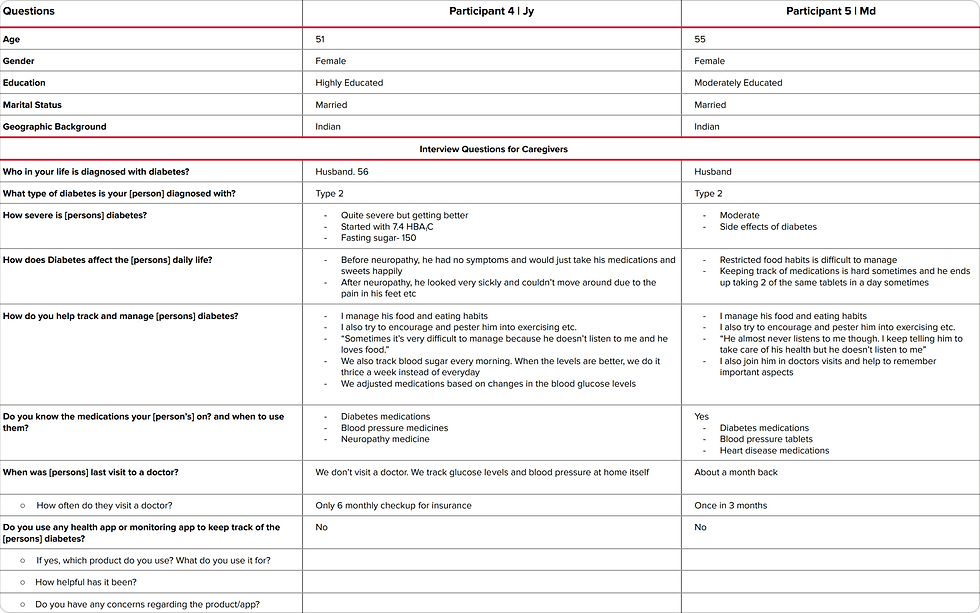
After researching about the topic, an expert Interview with an Endocrinologist was conducted to understand the condition from an experts point of view and to gain insight into how to tackle it. The expert also helped me understand how the condition affects people on a day to day basis and the various techniques that could be employed to remedy it.
Expert interview findings


Expert Interview
Expert Interview
Expert Interview
Key Research Findings
Pain Points
-
Diabetics find it difficult/cumbersome to manage their diets.
-
Diabetics don’t see immediate results/ improvements, this makes it hard for them to keep tracking their condition seriously.
-
Constant tracking of blood glucose levels is required to ensure that it stays within the range.
-
Diabetes requires complete lifestyle adjustment which is typically difficult.
-
Lack of motivation to make changes in diet and exercise, since diabetes is uncurable and patients feel that they are stuck with it anyways.
-
Invasive methods of tracking blood glucose levels.
-
Remembering to take medications amidst other responsibilities can be difficult.
Needs
-
Need motivation to follow treatment plans. This includes diets, exercise, , medications; sometimes even insulin.
-
Easy access to different solution ideas for diabetes. Especially in terms of diet.
-
To be able to get through daily routines without having to worry about forgetting medications.
-
To manage and control diabetes and keep it within check to ensure that they don’t get any complications.
Insights
-
Most diabetics don’t show any symptoms and directly contract complications. It could be hopeful to warn them of complications at certain blood glucose levels.
-
Providing a reward centre is important to give diabetics motivation to continue diet & lifestyle changes.
-
Goal setting can be helpful to keep diabetics engaged with their treatment plan.
-
Tracking of medical records and seeing their progress over the time could be helpful.
Findings
Putting the findings and insights into ‘Point of View’ statements & ‘How Might We’ questions
Insights
Needs
POV Statements
HMW Questions
Patients have difficulty sticking to treatment plan in terms of diets & exercise.
Patients need to be able to see some results to continue the radical lifestyle changes.
Patient needs some motivation to continue their treatment plan with diligence as they can’t see immediate results from the treatment.
HMW create features that will allow patient to see even minor progress in their condition?
Patients have a certain regular range of blood Glucose levels , which are normal fo them.
Patients need to be track their vitals to take notes of spikes or any drastic changes in their vitals.
Patient needs to be able to track the spikes in their vials because it is important to alter medications based on vitals.
HMW allow patient to track spikes in their vitals only when necessary?
Since diabetes is incurable, patients make lifestyle changes in order to reduce the chances of contracting complications.
Patients need to be track their vitals to take Patients need to be able to see what complications they could contract at their current diabetic severity.
Patient needs to be able to see clearly what complications they are avoiding through their lifestyle changes as this provides drastic motivation in doing more.
HMW educate patient about complications and how they can prevent them?
Findings
Understanding User Requirements
User Persona
The research findings helped me understand potential users and enabled me to outline user personas and empathy maps that helped guide me in the design process.
This persona symbolises the primary target group and helped me maintain direction in my process. The creation of empathy map for the persona helped to identify pain points and in empathising with potential users. The customer journey map also outlined the emotions encountered by a person diagnosed with diabetes.

Empathy Mapping

Customer Journey Mapping

Project Goals
Defining Project Goals
The empathise stage helped provide the framework to define the project goals which helped strike a balance between business, user and technical goals. This step brought clarity in the design process and helped connect the research to the process of design.

Project Goals
Project Goals
Project Goals
Comparative Analysis
The empathise stage helped provide the framework to define the project goals which helped strike a balance between business, user and technical goals. This step brought clarity in the design process and helped connect the research to the process of design.

Project Goals
Prioritising Features
On defining the project goals, I prioritised the various features required in the product and worked out the features necessary for an app in a Product Feature Roadmap.

Competitor Analysis
Information Architecture
Based on the background research, POV and HMW statements, an complete Information Architecture upto section level of the app was created to achieve a seamless experience.

Initial Sketches
The ideation stage started with sketching out ideas and wireframes based on the findings from the research and defining stages. Sketching helped in quick explorations of multiple different design solutions.
The goal was to create minimal designs that would be easy to navigate considering that the data requirements for the app were quite heavy.

Low-Fidelity Wireframes
Once the basic wireframes were laid out through sketching, these were converted into low fidelity wireframes where focus was given on functionality and overall layout of the pages.


Mid-Fidelity Designs
Low fidelity wireframes were then converted into the final designs, which were then tested for the user feedback.


User Testing & Findings
Upon completion of the mid-fidelity prototype, the design was tested on potential users. I tested the prototype with 5 users with primarily positive results. As per the tests, the users were delighted by the features and didn't face any problems with the features themselves rather faced some issues due to the limitations of the prototype. Some users had some trouble navigating around the app which I then resolved in the high priority revisions.
Summary
A total of 5 people participated in the usability test. The test was introduced to the participants as per the test plan. 3 users participated in-person & the other 2 participated in a screen-share testing over Google Meet. Out of the participants, 3 were diabetics, 1 was a caregiver and 1 was someone who frequently uses fitness tracking apps.
Overall, there were 7 major tasks:
1. Create an account in the App and setup your basic details
2. Set your target goals in the app
3. Setup your Medication reminders for oral medication
4. Mark the reminder for ‘Medication 1’ as done
5. Input your vitals (Blood Glucose and Blood Pressure) to the app
6. Add a new medication reminder for Insulin (Before breakfast and after dinner)
7. Explore the overall app (Home, Reminders, Trends and Profile)
The tasks can be segregated into 4 main flows that were tested:
1. Onboarding and Account Setup
2. Setting Goals
3. Setting Medication Reminders
4. Exploration
Testing Methods Used: Think Aloud, Observations and System Usability Score.
Task Completion Rate: 100% of the participants were able to complete the assigned tasks.
Error-Free Rate: 80% error-free rate. 2 users had some difficulty navigating the app in the first moment but was able to learn quite easily.
Usability Test Details

Usability Testing
Usability Testing
Usability Testing
Iterations Based On User Testing

Usability Testing
Final Designs
SUGAR
Redefining the meaning of sugar for diabetes
Onboarding & Account Set Up
The on-boarding flow slowly guides the user towards the account creation.
Draws focus on the key features of the app and then asks the user to create an account to begin.
The illustrations in the on-boarding brings a sense of lightness and breaks the serious nature of the app.
Upon account creation, the user is asked to input some basic details using sliders and buttons that will help setup their profile.

Homescreen
Splash Screen
Account Creation
Onboarding
Onboarding

Sign Up
Personal Details
Diabetes details
Task Completion
Account Setup
Setting Your Goals
The setting goals page follows the initial profile setup, urging users to set goals that they can then achieve.
The main purpose for setting goals on a monthly basis is to encourage users to celebrate the small victories and achievements. This is an extremely important step in a slow progressing disease such as diabetes.
This flow requires users to primarily set their target level ranges for blood glucose and blood pressure. The app also allows users to define when the app should remind them to check-in with their progress in order to remain consistent.

First Time User's Screen to Set Goals
Setting Goals From Homepage
Confirmation screen
Setting Up glucose & blood pressure levels
Goal Setting
Setting Up Progress Details

App Walkthrough Start Screen
Instruction Pages
Guided Walkthrough
Guided Walkthrough
Since the app is relatively of a technical nature, I included a walkthrough of the app features based on the usability test findings.
This walkthrough guides new users on the main features and pages and guides them on the usage of the navigation bar to access the same.
The walkthrough follows a similar style as the initial on-boarding to bring about seamlessness.
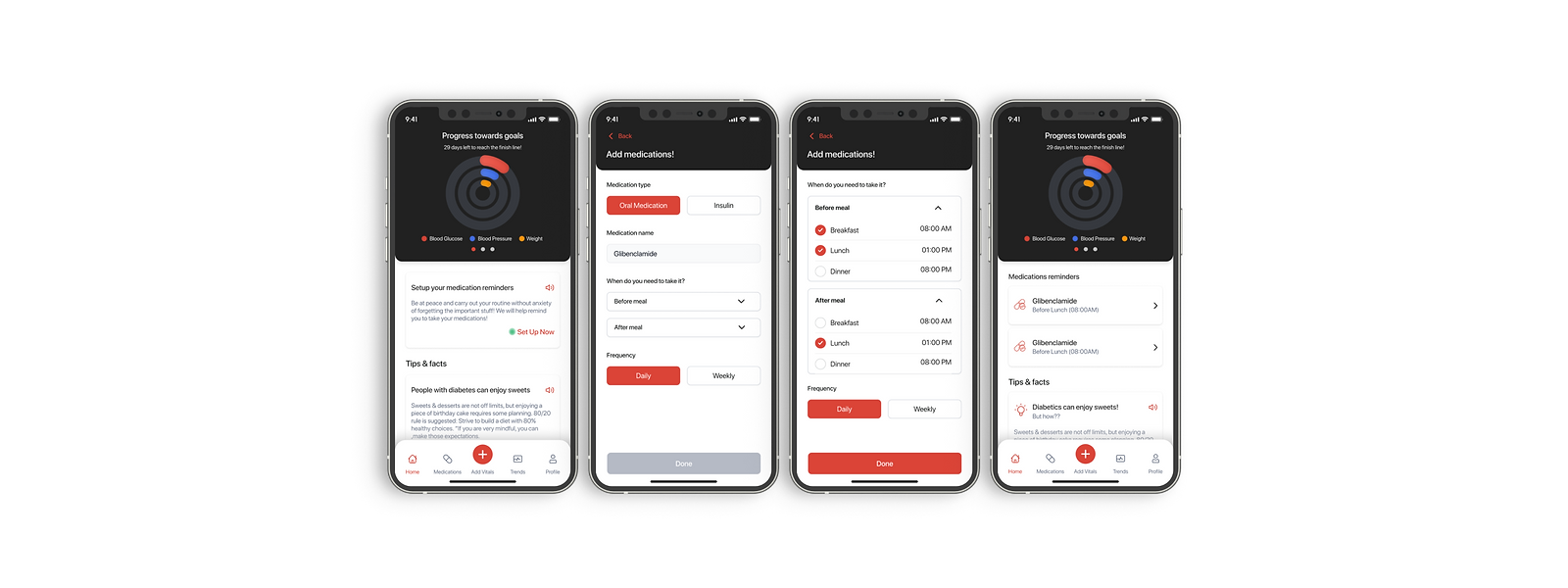
New User Dashboard
First time user medication reminder set-up
Finishing medication reminder set-up
Dashboard after setting up medication reminder
Account Setup
New User Medication Setup
Upon completing the walkthrough, a user lands on their dashboard wherein they will be urged to setup their medication reminders.
Here they can specify their medication and the timings they need to consume the same.

Active Users' Dashboard
1. Homepage:
-
The dashboard gives users an overview of their progress in a visual format.
-
It also shows upcoming medication based on time (before/after, breakfast/lunch/dinner) and gives users tid bits of tips and facts to help them keep going.
-
The progress chart also indicates to the users if they are at risk or have avoided diabetes related complications at their current levels.
Main Navigation Screens

Medications Page
Clock interactions to view medications
Form to add medications
Medication added page
Adding Medication reminders
2. Medications & Adding
Medication Reminders:
-
The medications page gives users an overview of all their medications, segregated by time.
-
Users can also add new medication reminders by tapping the "Add Medication" button which will redirect them to a form. Here, the users can choose the type of medication and set reminders based on the time and frequency of consumption required.
-
The clock in the page is also interactive, giving an overview of all the medications to be taken.
-
The medication cards follow the iOS pattern of swiping to find additional tools. Since in the usability testing, one of the concerns was that users may turn off the reminder but not actually take the medication, I came up with the solution wherein the app would notify the user 5 minutes after the reminder has been marked as "done" to confirm that the user actually took the medicine.
3. Add Vitals:
-
Users can access the vitals page directly from the navigation bar.
-
For the progress tracking to work efficiently, the users are required to track their vitals at least once every 2 weeks.
-
The app sends users a notification reminding the user to check-in on their progress.
-
Tapping this reminder takes them directly to the 'Add Vitals' page where users can input their vitals for blood glucose, blood pressure and other aspects.
-
This helps them remain consistent and actively progress towards their goals.

System reminder notification
Adding details in the form
Adding Vitals

Trends page: main graph + Blood Glucose Trends
Trends page: main graph + Blood pressure Trends
Trends Page
Trends page: main graph + weight Trends
4. Trends Page
-
The trends page helps users have an overview of their progress over a period of time through graphs and charts.
-
Here users can see the trends in their levels, segregated based on the different aspects.
-
These charts and graphs are interactive and can be filtered based on a certain time period or unit as well.

Profile Page Form
5. Profile:
-
The profile page helps users customise their app to suit their needs.
-
Here they can make changes to their basic details, normal levels and other details with ease.
Styleguide

Conclusion & Future Scope
The positive outcome from the user testing proved that the features were well received and needed. Users confirmed that celebrating small victories is the way to make progress in your condition as a diabetic.
Since diet and exercise are 2 other important factors that enable diabetics to improve their condition, I intend to work on creating the flows for these 2 aspects in my next step for the project.
bottom of page